3D Beach Waves Layered Shadow Box: A Practical Guide to Coastal Wall Decor
Creating high-quality wall art that captures the essence of a seaside retreat requires more than just a single image; it demands depth, texture, and dimension. The 3D Beach Waves Layered Shadow Box template offers a structured approach to achieving this aesthetic without the need for advanced sculpting skills or complex 3D modeling software. This digital asset is designed specifically for creators who utilize laser cutters and vinyl cutting machines to produce tangible, layered papercut designs. By integrating this template into your production workflow, you can streamline the creation of stunning coastal-inspired decor that adds a calming atmosphere to any interior space.
Understanding the Design Architecture
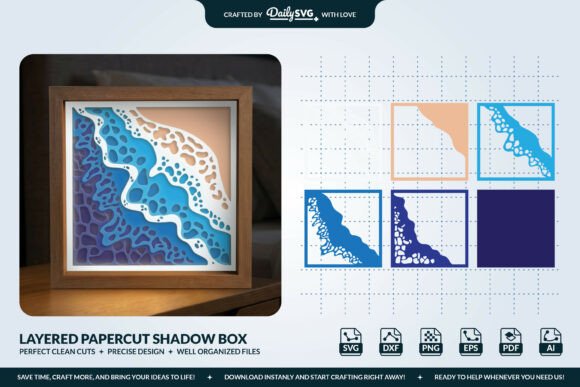
The core value of the 3D Beach Waves Layered Shadow Box lies in its multi-layered construction. Unlike flat vector graphics intended for simple printing or single-pass cutting, this design consists of up to six distinct layers. Each layer represents a specific element of the ocean scene, ranging from the distant horizon to the crashing waves in the foreground. When assembled within a shadow box frame, these layers create a parallax effect that mimics real-world depth.
This architectural approach is essential for professionals and hobbyists alike who aim to elevate their product offerings. The design is optimized with clean vector paths, ensuring that every curve of the wave and contour of the sand translates accurately during the cutting process. Whether you are producing a one-off gift for a beach house owner or manufacturing a batch of inventory for an online store, the precision of the file structure reduces material waste and minimizes post-processing cleanup.
Integrating the Template into Your Workflow
Incorporating the 3D Beach Waves Layered Shadow Box into your creative process begins with preparation and compatibility checks. Before initiating any physical production, it is crucial to verify that your software environment supports the provided file formats. The package includes SVG, DXF, PNG, EPS, AI, and PDF files, offering flexibility across various platforms. For users operating Cricut Design Space or Silhouette Studio Business Edition, the SVG and DXF files provide immediate importability, allowing you to scale the design to fit your specific project dimensions without losing resolution.
For those utilizing laser engraving systems like Glowforge or LightBurn, the layered nature of the file allows for automated nesting and cutting sequences. You can assign different power and speed settings to each layer if you are working with materials that require varied heat applications, although this design is primarily intended for through-cutting. The workflow efficiency gained here is significant; instead of manually tracing or recreating wave patterns, you can focus on material selection and assembly logistics.
Material Selection and Preparation
The success of a layered shadow box depends heavily on the choice of substrate. While the design is versatile, certain materials yield superior results regarding light diffusion and structural integrity. Cardstock and heavy-weight paper are excellent choices for beginners due to their ease of handling and low cost. These materials allow for quick prototyping, enabling you to test the visual impact of the layers before committing to more expensive resources.
For a more durable and premium finish, wood or MDF is highly recommended. Specifically, a thickness of 3mm is ideal for wood projects. This thickness provides enough rigidity to prevent the layers from bowing under their own weight while remaining thin enough to fit comfortably within standard shadow box frames. When preparing wood materials, ensure the surface is sanded smooth to avoid interference with the cutting blade or laser lens. Consistency in material quality directly impacts the final aesthetic, so maintaining a stock of uniform sheets is a best practice for consistent output.
Sizing and Spatial Planning
Determining the correct dimensions for your project is a critical step in the planning phase. The 3D Beach Waves Layered Shadow Box design is flexible, but for optimal wall decor impact, a size range of 20–30 cm is generally recommended. This scale strikes a balance between detail visibility and overall presence on a wall. If the piece is too small, the intricate layering may become indistinguishable from a distance. Conversely, scaling the design too large can introduce gaps between layers if the mounting hardware is not adjusted accordingly.
When planning a series of pieces, consider how the dimensions interact with the intended display space. For a gallery wall in a beach-themed office or home, varying the sizes slightly while maintaining the same design motif can create a dynamic visual rhythm. However, for a standalone statement piece, adhering to the recommended 20–30 cm range ensures the proportions of the waves remain natural and harmonious. Always account for the frame's internal depth when calculating the total height of the stacked layers to ensure a snug fit.
Software Compatibility and Execution
The technical robustness of the 3D Beach Waves Layered Shadow Box ensures seamless integration with major cutting software ecosystems. In Cricut Design Space, users can upload the SVG file, ungroup the layers, and organize them by color or cut order. This organization is vital for managing the cutting mat efficiently, as larger projects may require multiple mats to accommodate all six layers simultaneously.
Similarly, in Silhouette Studio Business Edition, the DXF and SVG files can be manipulated to adjust stroke widths or add registration marks if necessary. For laser users with LightBurn, the ability to import vector files directly allows for precise alignment and rapid job setup. The clean paths included in the Daily SVG package eliminate the need for extensive node editing, which saves time and reduces the risk of introducing errors that could compromise the cut quality. This compatibility extends to other industry-standard tools, making the asset a reliable component of a diverse maker's toolkit.
Quality Control and Assembly Strategies
Once the cutting phase is complete, the focus shifts to assembly and quality control. The layered effect relies on the precise stacking of each component. Using spacers or foam tape between layers is a common technique to enhance the 3D illusion. It is advisable to test the spacing with a prototype run using scrap material before assembling the final product. This step ensures that the "depth" does not overwhelm the composition or cause shadows that obscure the details of the waves.
Consistency in adhesive application is another factor that influences the professional look of the final piece. Uneven glue lines can cause layers to tilt, breaking the visual flow of the ocean scene. For wood projects, mechanical fasteners such as dowels or tabs can offer a cleaner look compared to visible adhesives. Implementing a standardized assembly line process, even for small batches, helps maintain high standards of craftsmanship and ensures that every unit meets the expected quality threshold.
Long-Term Value and Application
Beyond the immediate execution of a single project, the 3D Beach Waves Layered Shadow Box serves as a valuable asset for long-term business growth and creative exploration. For entrepreneurs running Etsy shops or local craft businesses, this design can form the cornerstone of a seasonal collection or a permanent niche in coastal decor. The ability to reproduce the design consistently allows for scalable inventory management and reliable fulfillment times.
Educators and workshop leaders can also leverage this template to teach students about vector design, material science, and the mechanics of 3D assembly. The clear distinction between layers provides an excellent opportunity to discuss spatial relationships and visual hierarchy. Furthermore, the relaxing nature of the beach theme makes it an attractive option for corporate gifting or interior design consultations, where creating a serene environment is a primary goal.
By choosing high-quality, optimized files from trusted sources like Daily SVG, creators ensure that their investment in time and materials yields professional results. The comprehensive file support, combined with the thoughtful design of the waves and beach elements, removes many of the technical barriers often associated with layered papercutting. Whether you are refining your personal craft or expanding a commercial product line, this template offers a practical, efficient, and visually rewarding solution for bringing the coast to your walls.