3D Layered Toucan Laser Cut File Guide
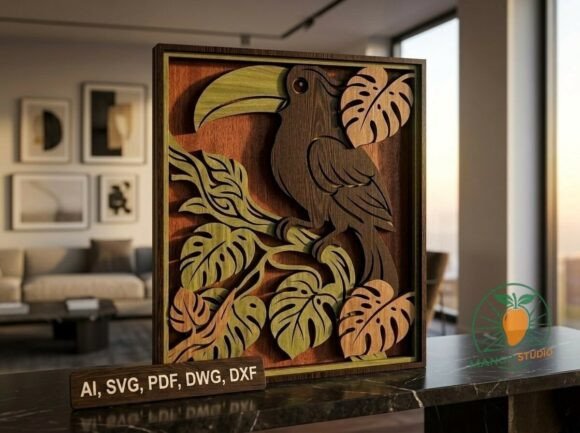
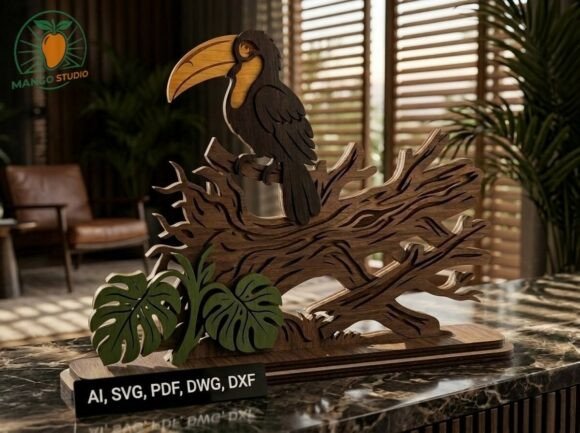
Bringing a touch of the tropics into your workshop or home office has never been more accessible. The 3D Layered Toucan Laser Cut File offers a sophisticated way to create dimensional art without needing advanced 3D modeling skills. This digital design transforms flat sheets of material into a striking, lifelike bird that stands out on any shelf or desk. Whether you are a hobbyist looking for a weekend project or a business owner expanding your product line, this file serves as a reliable foundation for high-quality craftsmanship.
Why Choose a Multilayer Design?
The appeal of layered laser cutting lies in its ability to create depth and visual interest using simple materials. Unlike single-layer silhouettes, which can look flat and generic, the 3D Layered Toucan Laser Cut File utilizes multiple stacked components to build volume. Each layer adds a new dimension, allowing light and shadow to play across the surface of the finished piece. This technique mimics the complexity of carved wood but is significantly faster to produce with modern laser equipment.
This specific design is optimized for precision. It accounts for the kerf—the width of the material removed by the laser—ensuring that pieces fit together snugly without excessive gaps or tight friction. For creators who value efficiency, this optimization means less time spent sanding edges or adjusting fits during assembly. The result is a professional-grade decorative item that looks far more expensive than the raw materials used to create it.
Technical Specifications and Material Compatibility
Understanding the technical requirements is crucial for a successful cut. The 3D Layered Toucan Laser Cut File is specifically engineered for materials with a thickness of 3 mm. This standard thickness strikes a perfect balance between structural integrity and ease of handling. While you can technically use other thicknesses, deviating from 3 mm may require manual adjustments to the nesting distances and glue application points.
Recommended Materials:
- Birch Plywood: Offers a natural grain that complements the organic shape of the toucan. The light color provides a great canvas for staining or painting.
- MDF (Medium Density Fiberboard): Ideal for projects requiring a smooth, uniform surface. MDF takes paint exceptionally well, making it perfect for vibrant, tropical color schemes.
- Acrylic: If you prefer a translucent or glossy finish, acrylic works beautifully. The layers can be stacked to create a glowing effect when backlit.
The final assembled product measures approximately 286 mm in width and 204 mm in height, including the base. These dimensions make it an ideal size for desktop displays, mantelpieces, or retail shelving units. It is large enough to command attention but compact enough to fit into most standard display cases.
Practical Applications Across Industries
The versatility of this digital asset extends far beyond personal decoration. Its clean lines and recognizable subject matter make it suitable for a wide range of environments.
Retail and E-Commerce
For small business owners, the 3D Layered Toucan Laser Cut File represents a low-risk inventory opportunity. You can produce items on demand, reducing storage costs and waste. Imagine selling these as part of a "Tropical Home" collection alongside matching planters or coasters. The consistent quality of the digital file ensures that every unit sold meets the same high standard, building trust with your customers.
Event Planning and Decor
Wedding planners and event coordinators often seek unique table centerpieces. A batch of these toucans, perhaps painted in pastel tones for a spring wedding or bold hues for a summer party, creates an instant focal point. Because they are lightweight yet sturdy, they are safe for public events where durability matters.
Educational Workshops
Teachers and workshop leaders can use this file to teach students about vector design, laser safety, and assembly techniques. The process of cutting, sorting, gluing, and finishing provides a comprehensive lesson in manufacturing workflows. Students learn how digital files translate into physical objects, bridging the gap between computer-aided design and hands-on craft.
Interior Design and Branding
Interior designers frequently need custom accents that match a specific theme. The toucan motif fits perfectly in beach houses, resorts, and offices aiming for a relaxed, creative atmosphere. Furthermore, businesses can customize the colors to match their brand identity, turning a simple decorative piece into a subtle branding tool for reception areas or conference rooms.
Workflow Efficiency and File Formats
One of the strongest advantages of sourcing a premium file like this is the variety of formats provided. Mango Studio includes AI, SVG, PDF, DWG, and DXF files. This flexibility ensures compatibility with almost any laser cutter software or CAD program you might be using.
If you work with Adobe Illustrator, the AI file allows for easy customization of colors or minor geometric tweaks. For those using LightBurn or RDWorks, the DXF and SVG formats offer clean vectors that slice cleanly without unnecessary nodes. Having all these formats available saves hours of conversion time and reduces the risk of errors during the setup phase.
Efficiency isn't just about cutting; it's about assembly too. The design includes clear alignment markers and logical stacking orders. This thoughtful layout minimizes confusion, allowing you to move quickly from the laser bed to the glue station. When you scale production, these small efficiencies compound, significantly increasing your overall output.
Tips for Flawless Execution
To get the best results from the 3D Layered Toucan Laser Cut File, consider a few practical steps before hitting the start button. First, always run a test cut on scrap material. Even if the file is optimized for 3 mm, variations in humidity or machine calibration can affect the fit. Adjust your power and speed settings until the edges are clean and blackened minimally.
When assembling, use a strong adhesive suitable for your chosen material. Wood glue works well for plywood and MDF, while cyanoacrylate (super glue) is better for acrylic. Apply glue sparingly to avoid seepage onto visible surfaces. Clamping the layers together while the glue dries ensures a tight bond and prevents shifting.
Finally, don't overlook the finishing touches. A light sanding after cutting removes any char marks left by the laser. Once sanded, you can stain, paint, or seal the piece. Painting each layer individually before assembly can add even more depth, creating a gradient effect that enhances the 3D illusion.
Final Thoughts on Creative Potential
The 3D Layered Toucan Laser Cut File is more than just a set of vectors; it is a gateway to creating tangible, beautiful objects. Whether you are fulfilling a client order, stocking your online store, or simply adding a pop of color to your living room, this design delivers consistent quality and visual impact. By combining precise engineering with artistic flair, it empowers makers to produce professional results with confidence. Thank you for exploring this project from Mango Studio, and we wish you flawless cutting, perfect assembly, and endless creative inspiration for your future endeavors.